Gibber Voice Generator
What is Gibber?
Gibber Voice Generator turns your script into character vocal sounds — without any real speech.
It doesn't do text-to-speech. Instead, it analyzes the rhythm, length, and punctuation of what you type, and generates a synthetic "performance" — something that sounds like a character talking, but carries no real language. Think of it as giving your character a voice shape rather than a voice content.
This is the same approach used in Celeste, Animal Crossing, FEZ, and countless pixel indie games. Now you can create the same effect directly in your browser.
Two Modes
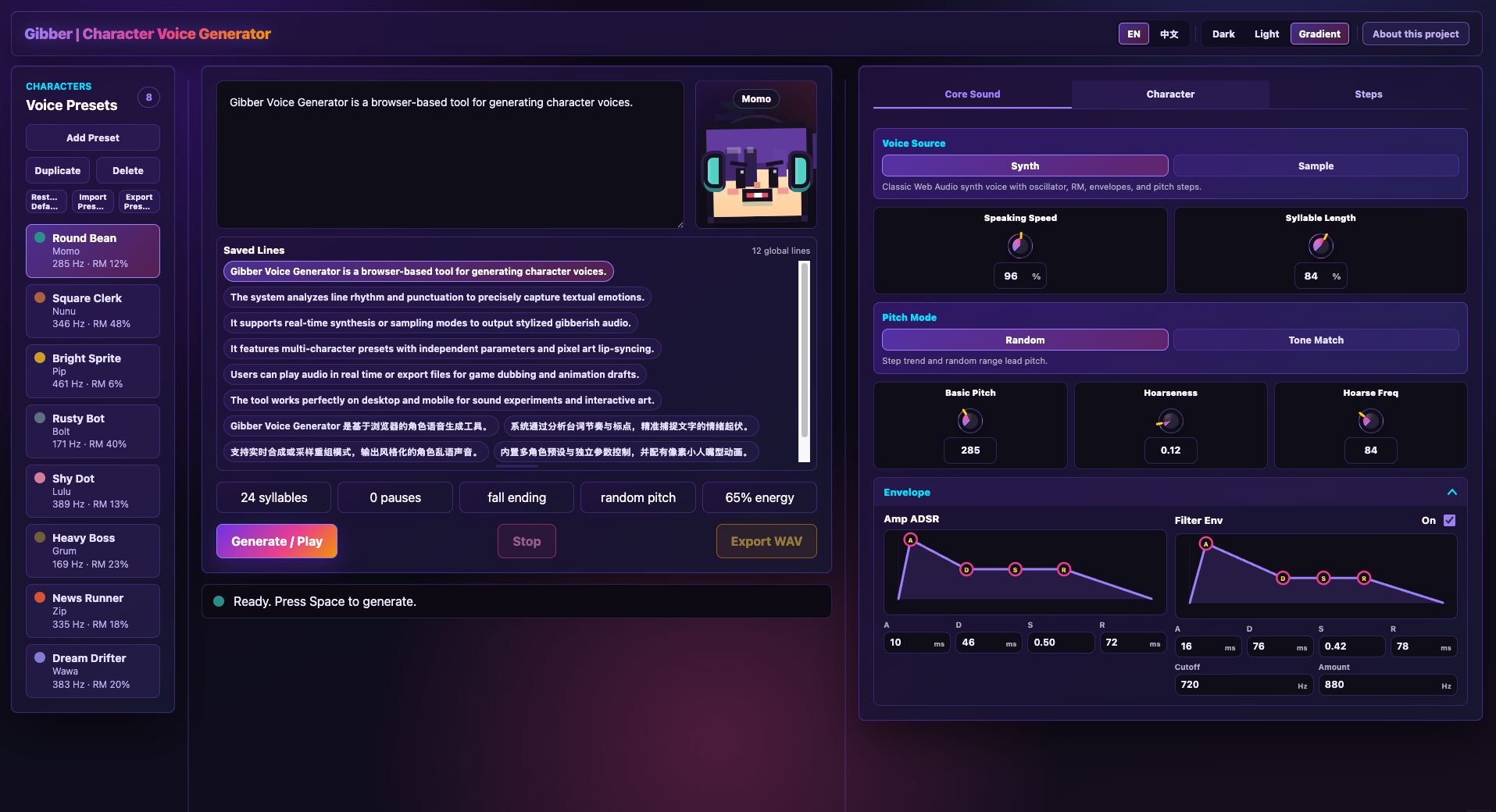
🎛 Synth Mode Generates voices entirely from scratch using Web Audio synthesis. No audio files needed. Great for robotic, alien, electronic, or stylized characters.
Control: base pitch, voice texture (RM depth), speech speed, syllable length, amplitude envelope (ADSR), filter envelope, 16-step pitch trend curve, and randomization range.
🎵 Sample Mode Upload your own audio (WAV / MP3 / M4A / OGG) — or use one of the 6 built-in demo sounds. The system slices the audio and reassembles it according to your script's rhythm, creating a voice that carries the texture of your original sound.
Supports: waveform preview, manual slice range selection, real-time slice highlight during playback, random vs. sequential slice flow, gain / limiter / make-up gain control.
Punctuation Matters
Gibber reads emotion from your script's punctuation:
Pitch rises at the end
More energy and intensity
Natural trailing pause
Short breath pause
| Effect |
|---|
| ? |
| ! |
| … |
| , |
The rhythm of your dialogue directly becomes the rhythm of the voice.
Characters & Presets
- 8 built-in character presets, each with a unique voice, pixel avatar, and color
- Each character can have their own saved line library for quick one-click playback
- Characters animate in sync — pixel mouth opens and closes with each syllable
- Fully customizable: create, copy, rename, or delete characters
How to Use
- Choose a character preset
- Type or select a line of dialogue
- Pick Synth or Sample mode
- Adjust pitch, speed, texture, and envelope parameters
- Hit Generate / Play to preview
- Export as WAV and drop it into your project
Works on desktop and mobile. Optimized mobile layout for quick on-the-go generation.
Who is it for?
- Indie game developers — prototype or final NPC voice lines, no budget needed
- Visual novel creators — character dialogue audio without a voice actor
- Animators — scratch audio that actually fits the character
- Sound designers — a generative tool for character voice experimentation
- Interactive artists — nonverbal voice as a medium in installations or web experiences
Technical Notes
- Runs entirely in the browser — no account, no backend, no installation
- Optional standalone download is avaliable
- Built with React, TypeScript, Vite, and Web Audio API
- WAV export included
- All settings saved locally in your browser
Pricing
Pay What You Want — minimum $0.
If Gibber helps your project, consider supporting its development. Every contribution goes toward new features, more character presets, and future updates.
About the Developer
Made by Fred Yuan Feng — sound designer and creative developer based in Edinburgh, UK. Graduate of MSc Sound Design, University of Edinburgh. Founder of Wave Grinder Ltd.
Download
Install instructions
Web version:
Play directly in your browser. No installation required.
If you want to download it as a standalone in your computer:
macOS:
Download the correct macOS build for your Mac:
- Apple Silicon Macs: use the Gibber-Apple-Silicon version.
- Intel Macs: use the Gibber-Apple-Intel version.
Unzip the file, then open Gibberish Sequencer.app.
Because this app is not notarized, macOS may show a security warning the first time you open it. If that happens, right-click the app and choose Open, then confirm.
Windows:
Download the Gibber-Windows version, unzip it, then run Gibberish Sequencer.exe.
No extra libraries or programs are required.
Leave a comment
Log in with itch.io to leave a comment.